


What are you searching for?

Search Result


1. Log in to online banking and in the navigation, click on the "Transfers & Payments" category then select "Bill Pay"
2. You'll be asked to set up a security question and accept the Terms and Conditions.
3. It will prompt you to "Add a Payee." Tell us about the person or company you wish to pay.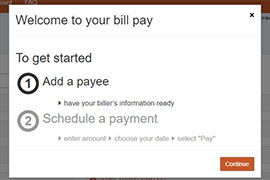
4. Enter the payment amount and the date the payment should be sent.
5. For recurring payments, select "Make it Recurring" in the payee dashboard.
6. Enter the recurring payment details such as amount, frequency and payment date.
7. Submit!

Home Loans
Find answers to common questions our members ask about the home loan process.
View all FAQs


Auto Loans
Get answers to your questions about consumer loans including vehicle, RV, marine and ATV loans.
View all FAQs
Debit and Credit Cards
Questions about your credit and debit cards? Find answers to common questions here.
View all FAQs
Business Banking
Common questions about business accounts, loans and services, including commercial real estate.
View all FAQs
Still have questions?
If you aren't able to find the answers you need, reach out to us. We are happy to help!